

Office Networks & Wi-Fi: A 30-Day Implementation Roadmap for Banks and SACCOs
A practical week-by-week guide to deploying structured cabling, enterprise Wi-Fi, firewalls and managed support across branches — with clear roles for IT, compliance, facilities and branch managers.
Why a roadmap matters for financial institutions
Banks and SACCOs in Uganda operate under tight regulatory scrutiny and member expectations. A network outage at a branch means tellers cannot process deposits, loan officers cannot pull credit files, and the core banking system goes dark for everyone connected to that link. The cost is not only lost transactions — it is reputational damage and potential compliance findings from the Bank of Uganda or UMRA.
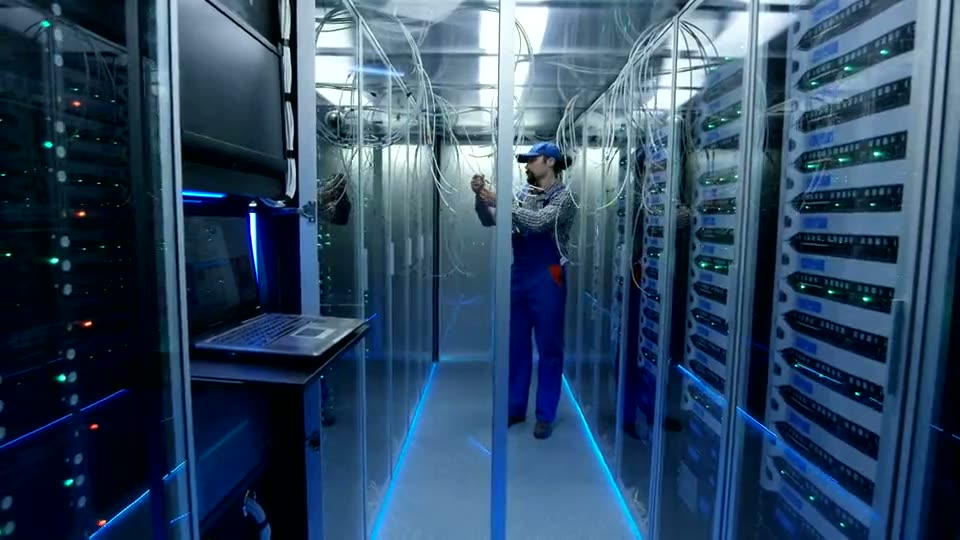
FTA's Office Networks & Wi-Fi service delivers structured cabling, enterprise-grade switching and Wi-Fi, firewalls, VPNs for branch and remote access, and ongoing managed support under a single service agreement. CCTV and door access can run on the same managed network. This article walks through what the first 30 days of adoption look like and who needs to be involved at each stage.
Week 1: Discovery, site surveys and stakeholder alignment
The first week is about gathering facts, not pulling cable. FTA's engineers conduct a physical site survey at each location — head office, every branch, any satellite office or agency banking point. They map existing cabling routes, cabinet space, power availability, ISP handoff points, and any legacy equipment that must stay or go.
At the same time, your internal stakeholders need to agree on scope. A typical steering group includes:
- Head of IT / CTO: owns the technical architecture, approves hardware specs, ensures alignment with core banking system requirements.
- Compliance / Risk Officer: validates that firewall rules, VPN policies and network segmentation meet regulatory expectations for data protection and transaction integrity.
- Facilities / Admin Manager: coordinates access to buildings, ceiling voids, trunking routes, and power schedules; ensures landlord approvals where branches are leased.
- Branch Managers: provide operational windows — when tellers are least busy, when the vault is open, when cleaning crews are absent — so installation causes minimal disruption.
- Procurement / Finance: reviews the service agreement, confirms budget authority, and sets up the recurring support line item.
Deliverables by end of week 1:
- Signed site survey reports for each location with photos and notes.
- A high-level bill of materials (switches, access points, firewall appliances, cabling, cabinets, UPS units).
- A draft project plan with target dates per site.
- A RACI matrix naming who approves what.
Illustrative example: A SACCO with 12 branches across central and western Uganda discovers during survey that three branches share a single ISP link via consumer-grade routers, two branches have no labelled cabling, and the head office server room has no spare rack units. These findings shape the phased rollout.
Week 2: Design sign-off, procurement and scheduling
With survey data in hand, FTA produces a detailed design package per site: cable routes, switch stack topology, AP placement heat maps, firewall zone definitions (core banking, guest, CCTV, management), VPN tunnel endpoints for branch-to-head-office and remote-staff access, and a labelling scheme that matches your asset register.
Your steering group reviews the design against three checklists:
- Regulatory checklist — Does segmentation isolate cardholder data, member PII, and management traffic? Are logging and alerting configured for audit trails?
- Operational checklist — Will tellers roam seamlessly between counters and back office? Does guest Wi-Fi for members have bandwidth caps and content filtering? Can the branch manager reboot a frozen AP without calling Kampala?
- Future-proofing checklist — Are there spare ports for the planned agency banking POS rollout? Can the firewall handle a future SD-WAN upgrade?
Once design is signed, FTA procures hardware. Lead times for enterprise switches and APs in Uganda are typically two to four weeks; the project plan reflects this. Meanwhile, facilities secures permits for any trunking through fire-rated walls or external mast mounts for point-to-point links between nearby branches.
Scheduling tip: cluster installations by region. A team can do three branches in Mbarara, Bushenyi and Ntungamo in one week, reducing travel cost and giving branch managers a single point of contact.
Week 3: Core infrastructure installation — cabling, switching, cabinets
Installation begins at the head office and the largest branches first, because they anchor the VPN mesh. Activities:
- Structured cabling: Cat6a or fibre runs to every workstation, AP location, CCTV camera, door controller and POS terminal. Each cable is labelled at both ends per the agreed scheme (e.g., HO-SW01-P23 for head office switch 1 port 23). Patch panels are dressed, tested and certified; test reports are handed over.
- Cabinet and power prep: Wall-mounted or floor-standing cabinets secured, UPS units installed and load-tested, PDU labelling matched to switch ports.
- Switch stacking and core configuration: Switches stacked, base VLANs created, spanning tree and loop protection enabled, management VLAN isolated, SNMP and syslog pointed to FTA's monitoring platform.
- Firewall rack-mount and initial policy load: WAN interfaces connected to ISP circuits, default deny policy applied, management access restricted to approved subnets, VPN tunnels built to peer firewalls at other sites.
Who is on site: FTA's certified installers, your facilities contact for access and keys, and ideally a junior IT engineer from your side to witness labelling and ask questions in real time. Branch managers ensure tellers are informed of brief downtime windows — typically two hours per branch, scheduled after 3 pm or on a Saturday.
Illustrative example: At a branch in Jinja, the installer finds an undocumented 20-metre cable run through a ceiling shared with the landlord's AC duct. The team photographs it, labels it, and updates the as-built drawing — avoiding a future fault that would have taken hours to trace.
Week 4: Wi-Fi deployment, segmentation and guest access
With the wired backbone live, enterprise access points are mounted per the heat map — ceilings, walls, or pole mounts for outdoor queues. Each AP is adopted into the controller, firmware upgraded, and radio profiles tuned for the environment (high-density teller hall vs. open-plan back office).
Key configuration steps:
- SSID design: Corporate SSID with 802.1X authentication tied to your RADIUS/AD; Guest SSID with captive portal, rate limiting (e.g., 5 Mbps per device), and DNS filtering; IoT SSID for CCTV and door access on a VLAN with no internet egress.
- Roaming tuning: Fast transition (802.11r) enabled, minimum RSSI thresholds set so devices hand off cleanly as staff move between counters.
- RF optimization: Channel width, transmit power and band steering adjusted after a post-install survey; neighbouring branch APs on non-overlapping channels where sites are close.
- Monitoring baseline: FTA's platform begins collecting client health, roaming events, and airtime utilization; alerts thresholds agreed with your IT team.
Compliance sign-off: Your risk officer verifies that guest traffic cannot reach the core banking VLAN, that captive portal logs are retained per data retention policy, and that the IoT VLAN has no route to the internet.
Week 5: VPN, remote access and branch resilience
Branches connect to head office over IPsec VPN tunnels with failover to a secondary ISP link (often 4G/LTE). Remote staff — field credit officers, auditors, mobile money agents — connect via a client VPN with MFA.
Configuration details:
- Tunnel design: Hub-and-spoke from each branch firewall to dual head office firewalls in active-passive; BGP or static routes with health checks for failover.
- Traffic steering: Core banking traffic forced over primary link; guest and IoT traffic over secondary; VoIP for IP phones prioritized with DSCP marking.
- Remote access policy: Certificate-based auth plus TOTP; split tunneling disabled so all traffic passes through firewall inspection; device posture check (AV, disk encryption) before tunnel up.
- Failover testing: Scheduled cutover of primary ISP at each branch to confirm VPN re-establishes within 30 seconds and core banking sessions survive (session persistence depends on your core system — test with vendor).
Your IT team owns the certificate authority and MFA server; FTA manages the firewall side. Document the test results — auditors will ask.
Week 6: CCTV and door access integration (optional but common)
Many banks and SACCOs choose to run CCTV and door access on the same managed network. This week covers:
- VLAN extension: Dedicated VLAN for physical security devices, no internet access, QoS for video streams.
- NVR and controller placement: In the same cabinet as the switch, on UPS, with redundant storage.
- Camera and reader cabling: PoE+ switches power cameras and readers; cable runs follow the same labelling standard.
- Access control policies: Branch manager can unlock doors remotely via the VPN; audit logs forwarded to SIEM.
Facilities and security teams lead this; IT provides VLAN and switch port config. FTA ensures the network side is rock-solid — the security vendor configures their application.
Week 7: Managed support handover, documentation and training
The service agreement kicks in. FTA's NOC begins 24/7 monitoring: link uptime, switch health, AP client counts, firewall CPU/memory, VPN tunnel state, and environmental sensors in cabinets.
Handover package includes:
- As-built drawings for every site (PDF and editable Visio).
- Port map spreadsheet linking switch port → patch panel → faceplate → device.
- Firewall rule base export with change-log template.
- VPN peer list with pre-shared keys (stored in your password vault).
- Escalation matrix: L1 (FTA helpdesk), L2 (FTA senior engineer), L3 (your IT lead), with response times per severity.
- Monthly report template: uptime, incidents, changes, capacity trends, security events.
Training sessions (two hours each):
- Branch managers — how to read the dashboard, reboot an AP, log a ticket, escalate a link-down.
- IT helpdesk — ticket triage, reading firewall logs, adding a VPN user, requesting a VLAN change.
- Compliance — extracting audit logs, verifying segmentation, reviewing monthly reports.
Week 8: Stabilization, first monthly review and continuous improvement
The first month under managed support is the stabilization period. Expect:
- Ticket volume spike as users discover coverage edges, legacy devices with odd DHCP behaviour, or printer VLAN mismatches.
- RF tweaks after real-world load — e.g., the teller hall AP may need power reduced to push clients to the adjacent AP for better distribution.
- Firewall rule refinement — false positives on IPS signatures for core banking traffic; whitelist adjustments documented.
- Capacity baseline — switch port utilization, AP client counts, ISP link saturation; informs next budget cycle.
First monthly review agenda (60 minutes):
- Uptime report per site vs. SLA.
- Top five incident types and root causes.
- Change log review — every firewall rule add, VLAN change, firmware upgrade.
- Security events — blocked connections, VPN auth failures, guest portal anomalies.
- Capacity trends — any site >70% link utilization? Any switch >80% port usage?
- Action items with owners and due dates.
This review becomes a standing monthly cadence. Over time it feeds your IT strategy: when to add a second ISP link, when to upgrade to Wi-Fi 7, when to consolidate branch firewalls into a virtual cluster.
Roles summary: who does what, when
| Phase | FTA | Your IT | Compliance | Facilities | Branch Manager |
|---|---|---|---|---|---|
| Survey | Lead | Participate | Review scope | Grant access | Provide windows |
| Design | Produce | Review & approve | Sign off segmentation | Confirm routes | Confirm windows |
| Install | Execute | Witness & learn | — | Coordinate access | Communicate to staff |
| Wi-Fi/VPN | Configure | Provide RADIUS/MFA | Verify logs | — | Test roaming |
| CCTV/Access | Network side | VLAN config | Policy review | Lead vendor | Approve schedules |
| Handover | Deliver docs & training | Receive & store | Receive logs | — | Attend training |
| Steady state | Monitor & maintain | Escalate & change | Monthly audit | Power/space | Report issues |
Common pitfalls and how to avoid them
- Skipping the site survey to save time — leads to cable runs through fire walls, missing rack space, and surprise costs. Insist on the survey.
- Using consumer-grade labels (handwritten tape) — makes future moves error-prone. Require machine-printed labels per your scheme.
- Leaving guest Wi-Fi open — members' devices on the same VLAN as tellers. Enforce captive portal and VLAN isolation from day one.
- No failover test — the first real ISP outage becomes the test. Schedule quarterly failover drills.
- Single point of knowledge — only one engineer knows the VPN certificates. Document in your password vault and cross-train.
- Ignoring the monthly report — it becomes a filing exercise. Treat it as a governance artifact; board committees may request it.
Budgeting for the recurring line
The service agreement covers monitoring, maintenance, firmware updates, on-site response (next business day for non-critical, four hours for critical), and the monthly review. There are no per-ticket charges. Capital expenditure is the hardware; operational expenditure is the monthly support fee. Both are predictable. When you open a new branch, the same model applies — survey, design, install, handover — with marginal incremental cost.
Next steps
If your bank or SACCO is evaluating network infrastructure — whether for a new branch rollout, a head office refresh, or a compliance-driven segmentation project — start with a site survey. It is the lowest-risk way to see the real state of your current cabling, coverage and security posture.
Was this article helpful?
Keep reading
Office Networks & Wi-Fi Myths vs Reality for Banks and SACCOs
Separate fact from fiction about office networking. Learn which myths hold you back and how to build a reliable, secure Wi‑Fi and cabling backbone that supports banking operations and member services.
ReadSecuring Retail Operations: Risks of Custom Software and How Trusted Automation Mitigates Them
Retail and distribution leaders face data breaches, process errors and compliance gaps when adopting custom software. This guide shows concrete steps to protect your business while reaping automation benefits.
ReadHow Can Retail & Distribution Leaders Secure the Right Store Space with WetuProperty?
Retail and distribution managers often wonder how to find trustworthy premises quickly and affordably. This Q&A walks through using WetuProperty to locate, verify, and lock in the perfect location, with concrete steps and safeguards.
ReadDiscussing a similar challenge in your operation?
Our consultants reply within 24 hours.